
Thinking of Moving Your Community to Kajabi? Start Here
Jul 13, 2026Thinking of Moving Your Community to Kajabi? Start Here
If you've been thinking about adding a community to your business, or you're tired of fighting the Facebook algorithm just to reach your own people, moving to a Kajabi community might be one of the best decisions you make this year.
I get asked about this constantly inside my Ignite membership.
- How do I set it up?
- Should it be free or paid?
- How do I keep it organized so it doesn't turn into chaos?
So during one of our recent live Q&A sessions, I walked through the whole thing behind the scenes... and it was so helpful that I wanted to share it here too.
The video above is an excerpt from that live session. It answers some of the most common questions I hear about setting up and optimizing a Kajabi community, and there's a free guide below so you can get started alongside the video.
First, the good news: if you're on Kajabi, you already have it
Every single Kajabi account comes with a community product for free. You don't have to buy anything extra or add another tool to your tech stack. It's sitting right there in your dashboard under Products > Community. It's just waiting for you to turn it on.
Here's the mindset shift that makes setup click. Think of your community as the overall umbrella for your business, not a single offer. That's why I named mine the Launch With Lydia Community, after my main brand. Underneath that umbrella, you decide who gets in and how it's organized.
Not on Kajabi yet?
This is one of the biggest reasons I love the platform... your community, courses, website, emails, and offers all live in one place. You can get started here with 3 months for $99, or take it for a spin with a free 30-day trial.
Free community or paid? Here's how to decide
The point of a free community is connection. It gives you a place to build relationships with warm leads... people who have raised their hand and said, "I want to hear from you." It's where you share resources, spark conversation, and build the kind of trust that eventually turns into paying customers.
A lot of people start with a free community and later turn it into a paid membership at $7, $9, or $27 a month. Free is simply the on-ramp.
So while a free Facebook Group is what helped me launch my business in 2020, I don't run a free Kajabi community right now. Instead, I have three access groups which are each tied to a different offer. But if I were starting fresh with no audience yet? I'd build a free Kajabi community as an additional place to build relationships.
The two pieces that keep everything organized
This is where Kajabi really shines, and where it beats a Facebook group for most people.
Access groups control who gets in. You can have as many access groups as you want, but I recommend sticking with just a few for easy management.
Channels control how each group is organized. On every one of my access groups, I keep the same four channels so members always know where to go. They include:
- Welcome and Introductions
- General Chat
- Questions and Feedback
- Celebrate Your Wins.
At the top of each channel is an image and a pinned post explaining what the channel is for. That consistency is the secret. When every group is organized the same way, nobody gets lost.
The feature that sold me: custom pages
Here's the piece most people don't know about. Inside your community you can add custom pages, not just channels. A channel is a feed. A custom page is a link to anything you want... your course hub, your resource library, your podcast, even your YouTube channel.
In my groups, that means members can access all of their training right from inside the community. They never have to go hunting through the library. Everything lives in one place, and that has always been my goal.
To learn more, check out this article in the Kajabi Help Center.
My favorite time-saving tip
If you take one thing from this, let it be this...
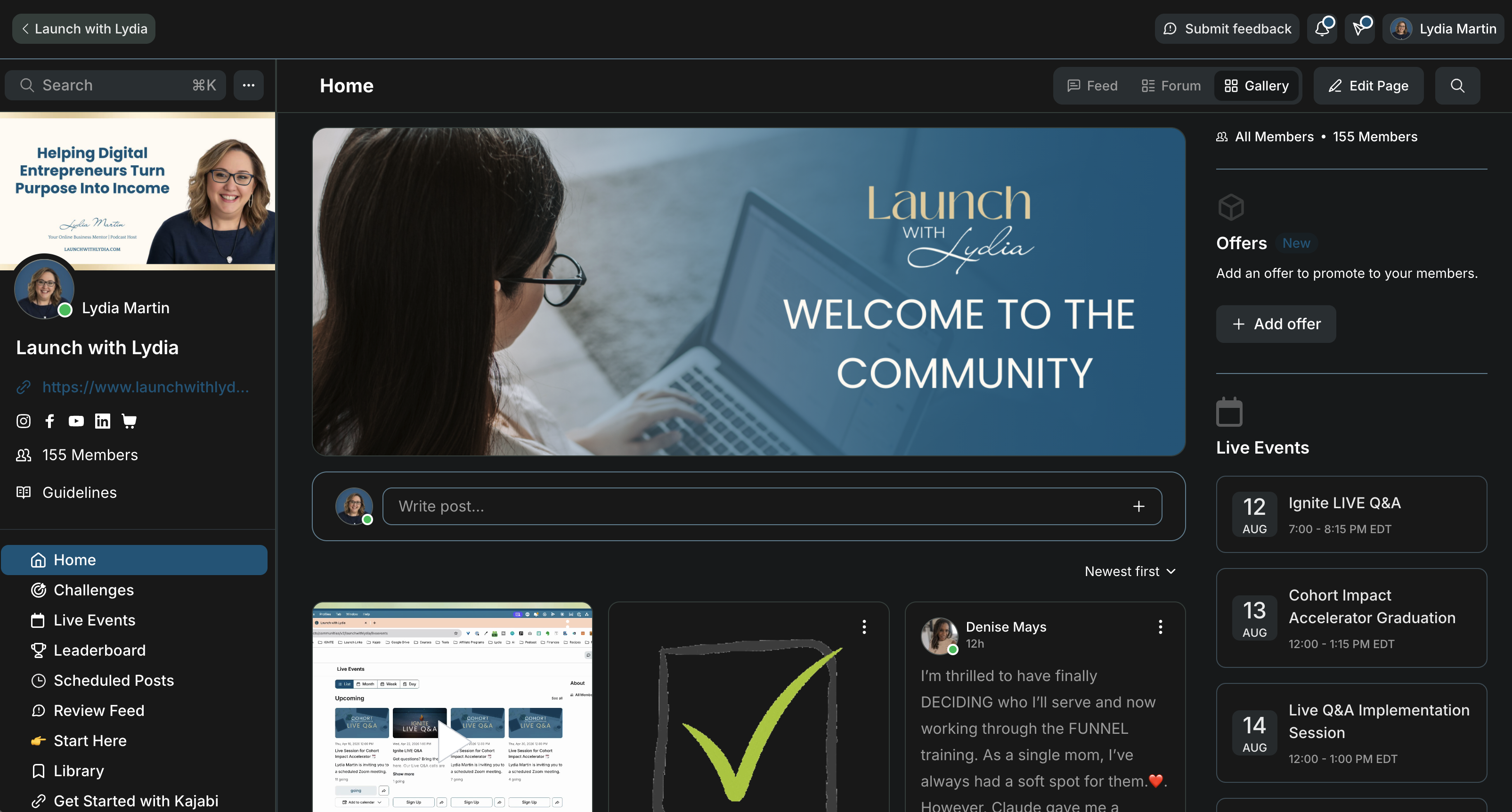
Pin the Home Page
For months I managed my community the hard way. Open a channel, answer a post, open the next channel, find the post, answer again. It took forever. Then I discovered the Home button in gallery view, which pulls every post from every channel and access group into one feed. Now I can see who posted, reply right there, and catch up in seconds.
Teach your members to use Home too. If they're in more than one of your groups, it saves them from wondering where they saw something. The answer is always the same... just click Home.
Want the guide?
I put together a free guide that walks you through everything in the video so you can set up your community with confidence. Download the guide here.
And if setting up a Kajabi community is just one of the things on your list right now, this is exactly the kind of hands-on support we work through together inside Ignite. Every month brings live Q&A sessions, tech tutorials, and a community of business owners building right alongside you. Join us in Ignite
Frequently Asked Questions About Kajabi Communities
1. Does Kajabi include a community feature?
Yes. Every Kajabi account comes with a community product for free. You'll find it in your dashboard under Community, and you can use it for a free community or a paid offer.
2. Is a Kajabi community better than a Facebook group?
For most people, yes. Facebook groups have become harder to grow because of the algorithm, and they're difficult to keep organized. A Kajabi community gives you channels to structure conversations, access groups to control who gets in, and the ability to keep your community, courses, and resources all in one place.
3. Should my community be free or paid?
Both work, and they serve different goals. A free community is best for building connection and nurturing warm leads. A paid community works well once you're ready to charge for deeper access. Many people start with a free community and later turn it into a paid membership.
4. What are access groups and channels in Kajabi?
Access groups control who gets access to your community... you can have a free group and as many paid groups as you want. Channels control how each group is organized, like Welcome and Introductions, General Chat, Questions and Feedback, and Celebrate Your Wins.
5. What is a custom page in a Kajabi community?
A custom page is a link to anything you want, added right inside your community. Unlike a channel, which is a feed, a custom page can point to your course hub, resource library, podcast, or any other URL. It's a simple way to keep everything your members need in one place.
6. How do I stay on top of activity in my Kajabi community?
Use the Home view in gallery mode. It pulls every post from every channel and access group into one feed, so you can see what's new and reply without clicking into each channel separately. It's the biggest time-saver for community admins.
7. Do I need a paid Kajabi plan to build a community?
You need a Kajabi account, and the community feature is included at every plan level. If you're not on Kajabi yet, you can start with 3 months for $99 or a free 30-day trial. Visit https://launchwithlydia.com/kajabi to learn more.
Want to be updated when new episodes are released?
Simply enter your email below!
We keep emails safe and spam free.